
The ZeeBORN Web Dashboard Has Grown Up
November 2026
In March we introduced the ZeeBORN Web Dashboard: certificates, the voyage schedule and approvals for purchasing, risk assessments and drills — in any browser, without installing anything. Since then, the Web Dashboard has grown from a handful of functions into a real companion to the ZeeBORN desktop application.
Everything you do in the Web Dashboard is written to the same database the desktop application uses — and it follows the same rules.
Decide on the Go
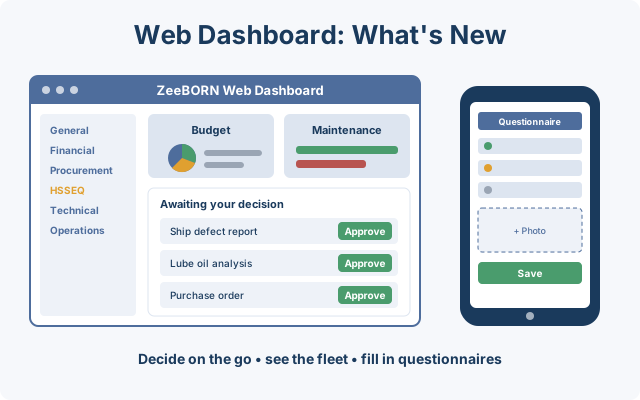
More decisions can now be made from a laptop, tablet or phone:
- Ship defect reports: the office approval step, with the same checks the desktop application performs — for example a required review of a linked risk assessment or management of change.
- Lube oil and bunker analyses: release laboratory results as passed or failed, with a remark when rejecting.
- Purchasing, risk assessments and drills — already available in March — now check exactly what the desktop application checks. Purchase approvals respect each user's approval limit, and an approved risk assessment notifies the vessel.
Your Fleet at a Glance
- Budget: usage, limit, booked and remaining amounts, with a breakdown by vessel and by account.
- Maintenance: the planned maintenance status of every vessel, with critical and overdue jobs highlighted.
- Audits, inspections, conditions of class and management of change — each in its own list, with status and open tasks.
- Documents: controlled documents with version and status — view or download the released version.
- Vessel documents: vessel particulars, general arrangement plan and time charter with one click.
- Certificate compliance as a report across the fleet.
Fill In Questionnaires From the Browser
Inspection questionnaires can be completed directly in the Web Dashboard: answer topics, add observations, attach photos by drag & drop and create an observation straight from a photo. More about this in our article on inspection questionnaires.
Made for Everyday Use
- Familiar navigation: modules are grouped exactly as in the desktop application. You see what your rights allow — nothing more.
- Your own dashboard: choose which items appear on your personal to-do page. The setting is shared with the desktop application.
- Clear the list in one go: mark several dashboard entries as read at once.
- Install it like an app: add the Web Dashboard to the home screen of your phone or tablet.
Want to see the Web Dashboard with your own data? Request a demo — we'd be happy to show you around.
Copyright 2026 ZeeBORN GmbH — www.zeeborn.net